OpenScreen 2 on Product Hunt: free MIT recorder with AI agent edits
Record once. Automatic zooms on clicks. Local transcript cuts. Optional MCP agent for the rest. Free, no account, no watermark. Windows, macOS, Linux.
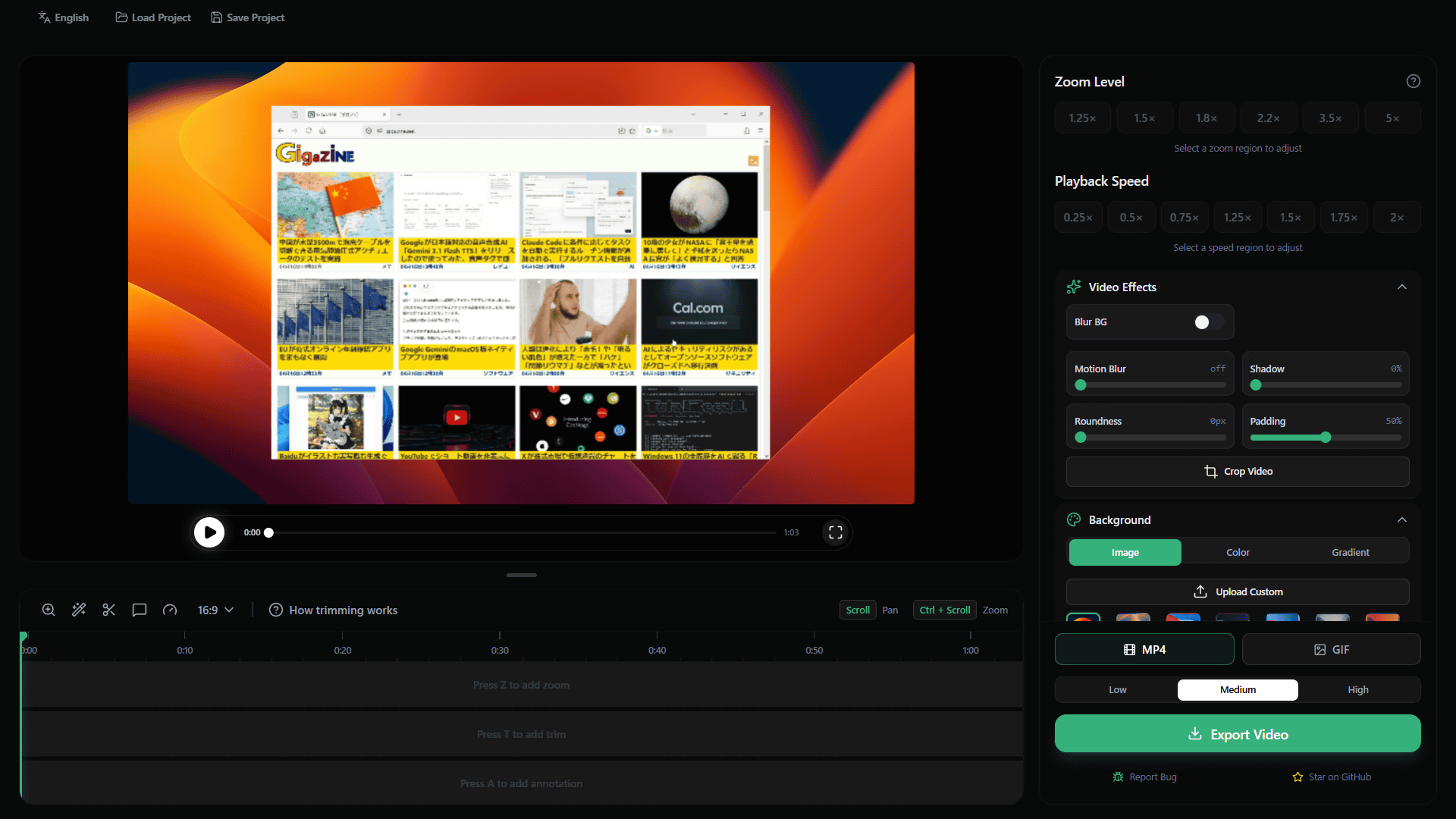
Etienne Lescot shipped OpenScreen 2.0 on Product Hunt on 11 October 2026. Free MIT screen recorder and editor. Automatic zooms from clicks, local Whisper, optional BYOK agent or local MCP for edits. Stays on-device unless you connect a key.
OpenScreen 2 on Product Hunt: free MIT recorder with AI agent edits
I record a lot of product demos. Most of the time the first take is fine if the framing is already decent and the dead air is easy to cut. OpenScreen 2.0, which hit Product Hunt on 11 October 2026, aims at exactly that workflow.
Etienne Lescot maintains it. The original project came from Siddharth Vaddem, who archived it after v1.5.0. Lescot took it over with approval and spent about four months on 2.0. 137 people have contributed so far. It placed fifth on the Product Hunt daily leaderboard that day with 142 upvotes at the time of writing.
The promise is simple: record your screen and the demo already looks finished. Automatic zooms sit on your clicks, planned as shots rather than one zoom per click. A smoothed, restyleable cursor. Wallpaper or gradient, padding, shadow, rounded corners, and a little motion blur already applied. Then either cut by deleting words in the local transcript or hand the rest to an agent.
What you actually get
- Free forever under the MIT license. Personal and commercial use. No watermark. No account. No usage caps or paywalls.
- Native capture: ScreenCaptureKit on macOS, Windows Graphics Capture on Windows, PipeWire via the ScreenCast portal on Linux.
- GPU compositor with backends for Direct3D 11, Metal, and wgpu. Export is roughly 15 times faster than the prior version on their reference laptop. MP4 via H.264 (720p up to source resolution, 24/30/60 fps) or GIF. No cloud queue. The file is on disk when the bar fills.
- On-device transcription with whisper.cpp. About 264 MB model downloads once on first use. Works fully offline after that. Supports 100 languages. Captions burn into the render; you can restyle typeface, size, color, and position live. Translation into 15 languages requires connecting a provider key.
- Webcam layouts: picture-in-picture, dual frame, vertical stack, or none. Background blur, cutout, or replace runs on-device with no green screen required.
- 3D camera options that can turn or orbit the screen with zooms, plus depth of field. Five cursor packs (Studio Ink, Prism Glow, Pop Coral, Pixel Candy, Star Sprout), each available as a 3D version with shadow.
- Multi-clip timeline. Import existing video files. Annotations for text (with animations), arrows, images, and blur regions (smooth or mosaic, rectangle or freehand). Speed ramps, Full Camera segments, blur for emails or keys.
- Aspect ratios including 16:9, 9:16, 1:1, 4:3, 4:5, 16:10, and 10:16 from the same take. Format can be set to Auto, which wraps the frame with even padding.
Recording, editing, transcription, and export stay entirely on your machine. Text only leaves when you deliberately connect a provider for the chat editing panel or for caption translation. The Whisper model download, annotation fonts, and update checks are the only other network touches.
The agent part
This is the piece that matters if you already live in Claude Code, Codex, or another MCP client.
There are two practical ways to let an agent edit a project:
- Built-in chat panel. Open the chat column in Edit mode (toggle at the far left of the top bar). Go to AI settings, pick a provider, and paste an API key for the Claude API, OpenAI API, Gemini API, Mistral API, OpenRouter, MiniMax, or any OpenAI-compatible endpoint. Keys are stored encrypted through the OS credential protection (Electron safeStorage). If encryption is unavailable the write fails rather than falling back to plaintext. Requests go straight from your machine to the provider you chose. OpenScreen has no servers that see the key. Nothing is enabled by default.
Describe the edit in plain language: “cut the dead air in the intro”, “zoom in when I open the terminal”, “remove the ums”. The agent works through real, undoable timeline operations rather than a re-render. It can add and adjust trims, zooms, speed regions, annotations, and Full Camera segments; edit clip in/out points; reorder or remove clips; and read the transcript to find the span you mean. Conversations keep history. There is a model picker and a context meter. You can rewind to an earlier message, which rolls back the agent’s edits and later turns together. Project edits start switched off: the agent can still read and describe the change it would make, but it applies nothing until you turn the switch on. Ctrl/Cmd+Z undoes an agent edit exactly like a manual one. Smart cuts appears as a one-shot option in the timeline’s auto-enhance menu (marked With AI).
- Local MCP server. In AI settings turn the MCP server on. It listens only on your own machine (127.0.0.1) on the shown port. Copy the Claude Code or Codex command displayed there (the Claude Code command carries the access token; Codex reads OPENSCREEN_MCP_TOKEN from the environment). Keep the target project open in the OpenScreen editor, then ask your coding agent for the edit. MCP clients can only read until you also turn on Project edits in the MCP server section. That switch is separate and starts off. Once enabled, each edit saves as it lands and can be undone with Ctrl/Cmd+Z. Clients are instructed to save a checkpoint before a series of edits so you can ask them to restore the project in one step. Regenerate the token to disconnect every client that used the old one.
There is also a stdio MCP mode for the full loop. The agent starts the app’s own executable with the mcp argument. It receives the same editing tools plus listSources, startRecording, stopRecording, setPointerTrack, exportVideo, and getFrames. No port or token is required because the agent launches the process with your rights. A scripted take (Playwright, for example) never moves the real screen pointer; the agent supplies its own action log via setPointerTrack and the video still gets a cursor and automatic zooms. The openscreen-demo skill teaches an agent the entire job from storyboard to finished video, then attaches the result to a pull request so reviewers can watch the change in place, or drafts a post for X that it publishes only after you confirm. Add the skill with npx skills add getopenscreen/openscreen --skill openscreen-demo.
A command-line interface ships as well. openscreen record --duration 20 --project demo.openscreen --json, then export, captions, or pack. JSON output suits scripts and agents. Headless recording still requires a real desktop session and display server.
Limits that actually matter
- Agent edits require your own API key and an internet connection for the model calls. Transcription, automatic zooms, framing, and export do not.
- There is no review step before agent cuts land. Each edit is one undo step. Cuts are made by word ID so a misheard word still cuts at its own audio timing. English and French use a forced aligner for word boundaries; other languages fall back to Whisper’s own timings, which are looser.
- The tool is aimed at polished product demos, tutorials, and walkthroughs. It is not a full non-linear editor. No multi-camera sync, color grading, or complex keyframe animation.
- The Windows .exe installer is not code-signed, so SmartScreen warns. The recommended route on Windows is the Microsoft Store listing. macOS builds are signed and notarized. Linux packages include .deb, .rpm, AppImage, and a Nix flake; native capture needs PipeWire and the portal.
- Interface available in 15 languages. The .openscreen project format can still change between releases, so scripts that parse it should expect updates.
- Automatic zooms themselves need no AI and no network. They simply read the recorded click telemetry.
Why this showed up on the launch desk
Indie founders ship demos constantly: Product Hunt pages, documentation, GitHub READMEs, customer calls, and feature announcements. Tools in the Screen Studio category usually cost money and often require accounts. OpenScreen 2.0 is the free MIT alternative that already applies decent framing on the first take and then lets the coding agent you already have finish the cut without the video leaving the machine.
Version 2.0.0 itself appeared on GitHub around 3 October 2026. The Product Hunt launch on the 11th is the public push. Source code, releases, and issues live at github.com/getopenscreen/openscreen. The website is getopenscreen.com, with full docs for recording, AI editing, installation, and the CLI. A Discord is linked from the site.
If you already have Claude Code or Codex open and a demo to cut, the MCP path is the interesting one. Everything else works with zero extra setup beyond the one-time Whisper model download. I will try it on the next launch video. The local-first constraint is the part I actually care about.
Sources: Product Hunt listing for OpenScreen 2 (featured 11 October 2026), getopenscreen.com together with its AI editing, recording, installation, and CLI documentation pages, the GitHub repository getopenscreen/openscreen (v2.0.0 release notes and subsequent commits), and the maker’s comments on the Product Hunt launch page.
Community
What do you think?
0 comments
React to this article
Comments
Trending now
What readers are opening



Written by
Kirtesh Admute
Founder
Kirtesh Admute is the founder of IndieFounder, a platform for founders, builders, and people curious about technology. He writes about AI, startups, software, product building, and the lessons that come from building in public.
See an issue with this story?
Continue reading

